Move from a conversation to an order.
Send a Buy link when a customer is interested. They can review the product, choose their quantity and enter their details on the hosted page.
Buy links
Choose a product and price, then share a hosted offer in a message, campaign or on your website. Create the link in Inttegro or generate it through the API. Customers can choose their quantity and continue to payment without you building a storefront.
Create your first Buy link for free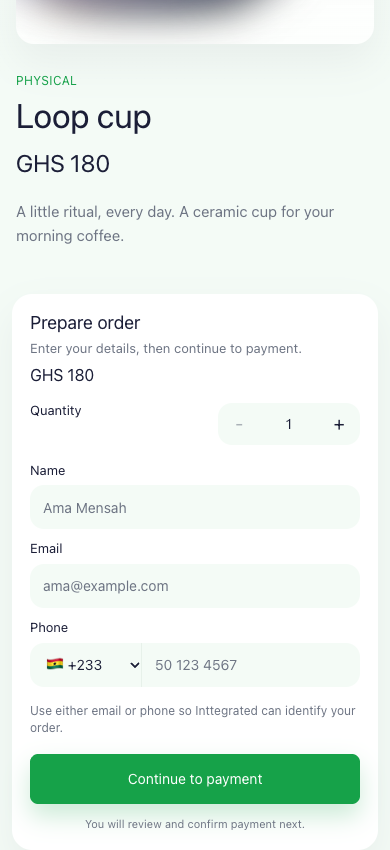
Quantity, usage & expiry
Set limits for a specific sale or keep a campaign open to many buyers. Manage those controls in Inttegro or through the API. The selected product and price stay fixed; a different offer needs a new link.
Explore catalog & offers
Orders from Buy links
Each purchase creates an Inttegro order with the customer, items, amount and payment state. Your team can find it in the dashboard, and your application can retrieve it through the API. Check the payment outcome before arranging delivery or providing the service.

Choosing a hosted experience
A Buy link offers a product and creates an order when someone buys. If you have already prepared a specific customer order, its hosted invoice takes that customer straight to order review and payment.
Meet hosted CheckoutUse the Buy page’s product-aware labels, or configure its checkout heading and ready-state action through the API. The hosted form and validation stay consistent while the wording fits your offer.
Payment methods and activation depend on account setup.
Check availabilityFrom an offer to a purchase
A team preparing occasional offers can work in the dashboard. An application generating offers during a sales workflow can create the same hosted links through the API.
Buy links
No. Inttegro hosts the offer page. You need a product and price, then you can share the link through a message, email, social post or QR code. Payment activation and available methods depend on your account setup.
Use single-use when the link should create only one order. It is consumed on successful order creation, not on confirmed payment. Use multi-use for a public campaign or product offer where many customers should be able to create separate orders. Anyone with an active link can view the offer.
You can update quantity limits, expiry and active state, or cancel the link to stop accepting new purchases. Changing its product, price or usage mode requires a new Buy link. Existing orders remain separate records of the purchases already started.