Use the dashboard
Create and name accounts for distinct operations, then switch to the relevant account for everyday work. Available actions depend on the user’s permissions and the account’s capabilities.
Start for freeBusiness groups & multiple brands
Give each brand, business unit or sales channel its own Inttegro account when it needs separate commerce records. Keep orders, customers, balances and payouts associated with the right operation, while authorised teams work across their accounts in the dashboard and developers connect each business through the API using its intended account context.
Set up your business accounts for free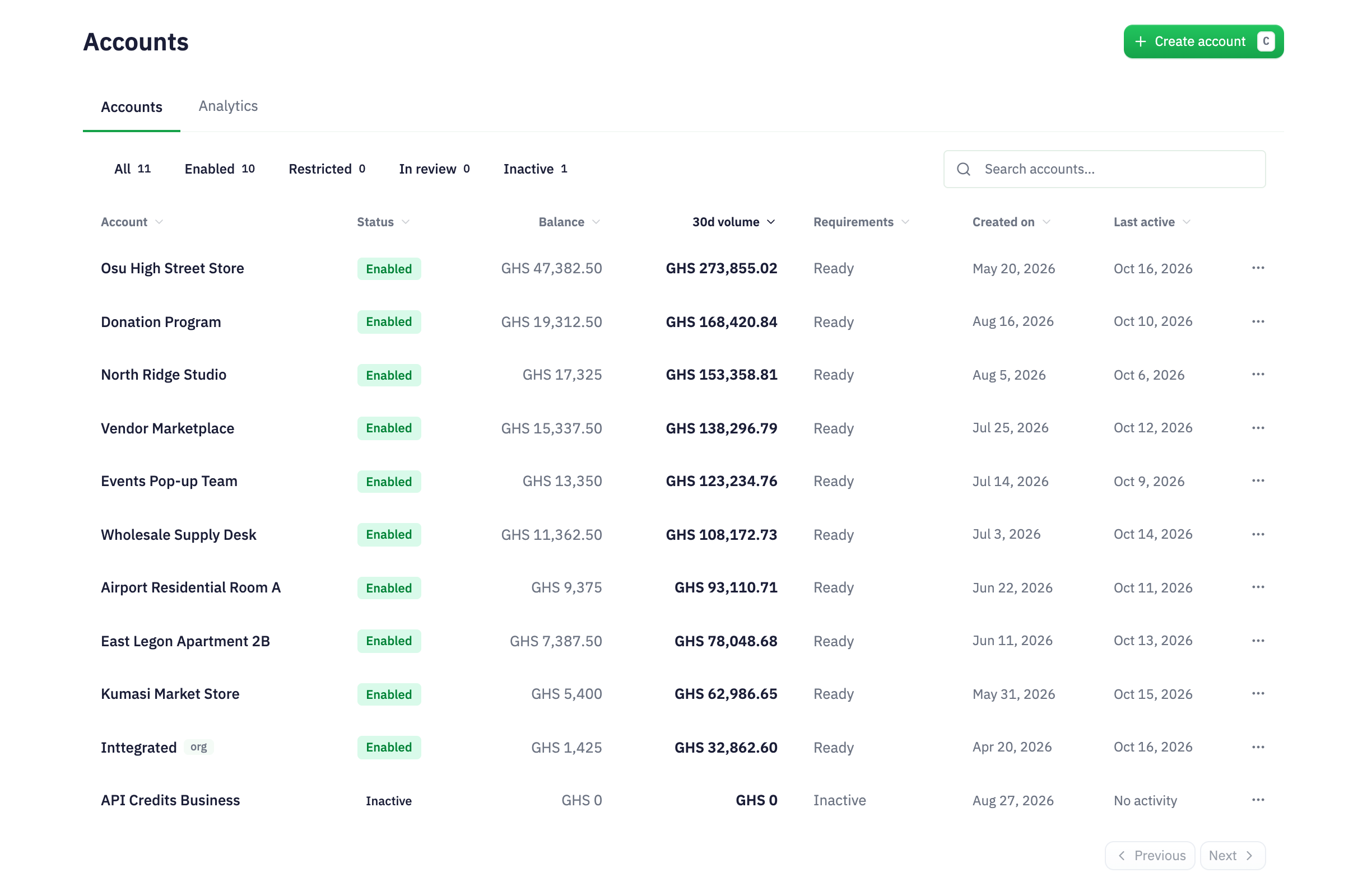
A group of distinct businesses
A group with separate retail, services and digital businesses can give each operation its own account rather than relying on names or tags to separate transactions later.
Decide which businesses or channels need their own orders, customers and money records.
Name the accounts and establish the appropriate relationship and credential policies.
Choose the intended account before managing sales or connecting an integration.
Account organisation
Two brands can share an owner without sharing the same day-to-day sales process. An Inttegro account provides a boundary for an operation’s orders, customers, payment methods, balances, payouts and messages. Create accounts where that separation serves the business, rather than using one record pool and expecting teams to untangle it later.
Names and descriptions make the accounts understandable to the people using them. The parent–child relationship expresses placement, while explicit management and credential policies determine the intended operating model. Account structure does not replace your legal or accounting arrangements.
Explore account-level order operationsShared ownership does not require every operation to use the same account.
Named business accounts
Your retail brand and service business can use the same operating tools without losing their identities. Open a named account to review its business activity, then enter its workspace to manage orders, customers and messages. The account name and details keep the operation visible as your team moves between businesses.
Developers can preserve that context in the systems they connect. Associate each website or internal workflow with its intended account and retain the account ID alongside your records. Authorised users work with that operation’s information; a shared interface does not turn separate businesses into one customer or transaction database.
Explore customer operations

Account analytics
Review gross and net revenue, order counts and success rate for the account you have selected. Choose a reporting period and compare it with the prior period to understand whether that business’s sales and order conversion are changing. The summary provides a starting point before you inspect the detail.
Revenue trends, gross-and-net movement and order-conversion charts help you see what changed within the business. Move to its order records when you need the context behind a purchase. These are account-specific performance views—not pooled funds, intercompany transfers or consolidated group financial statements. Keep each account’s currency and reporting period in view when comparing operations.
Explore account analytics
Create and name accounts for distinct operations, then switch to the relevant account for everyday work. Available actions depend on the user’s permissions and the account’s capabilities.
Start for freeProvision child accounts and connect each business’s systems in the correct account context. Store identifiers and credentials deliberately; bring separate account records into your own reporting only where you have authorised access.
Read how to create business accountsUse a separate account for a durable business, brand, seller, tenant or channel that needs its own operating records. Do not create accounts for individual shoppers or purchases; those belong in customer and order records within the relevant account.
Each account has its own commerce records. Do not assume that a customer, payment method or balance from one account is available in another. A shared organisational relationship is not a pooled balance or a shared customer database.
This solution uses account-specific operations and reporting. It does not promise an automatic group-wide financial dashboard or transfers between account balances. Your reporting integration must retain each account’s boundaries, currencies and authorised access.
Choose the account boundaries first. Then give teams and integrations a consistent way to work without losing the identity of each operation.