Invoices with the details attached.
Carry the amount due, currency, payment status and invoice reference as structured data. Compatible email clients can recognize the bill, not just display its contents.
Chimes
Send receipts, collection reminders and order updates by email or SMS from Inttegro or your application. Chimes supports individual messages, broadcasts and scheduled sends, with reusable templates and a record of each delivery attempt.
Set up customer messaging for free
Structured email
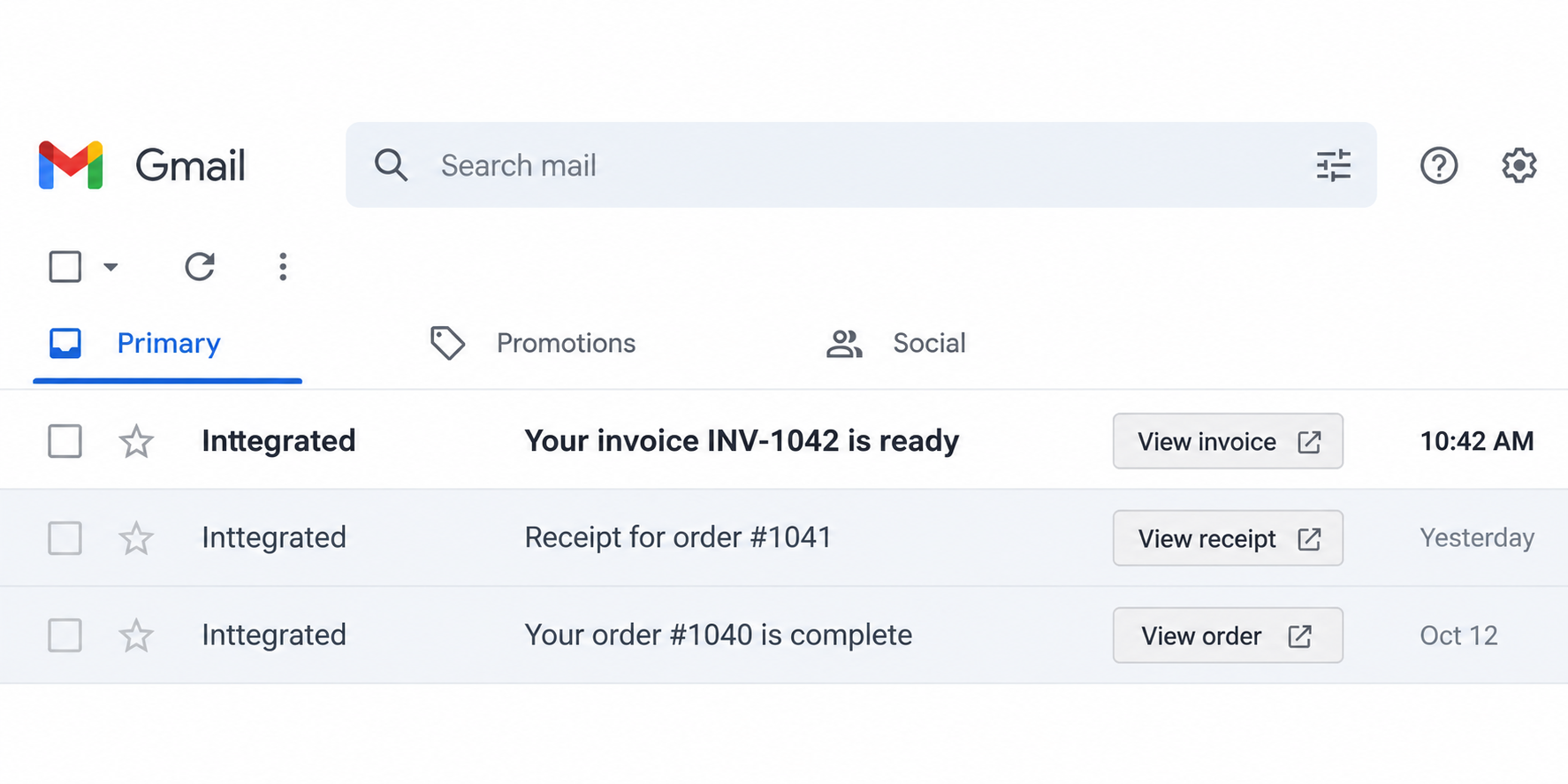
Chimes adds schema.org markup to supported emails. Invoice details, purchased items and links become structured data that compatible clients can use to identify the document or offer an inbox action.
{
  "@context": "https://schema.org",
  "@type": "EmailMessage",
  "publisher": {
    "@type": "Organization",
    "name": "Inttegrated"
  },
  "potentialAction": {
    "@type": "ViewAction",
    "name": "View invoice",
    "target": "https://example.com/i/INV-1042",
    "url": "https://example.com/i/INV-1042"
  }
}
Carry the amount due, currency, payment status and invoice reference as structured data. Compatible email clients can recognize the bill, not just display its contents.
Order markup connects the merchant, purchased items, quantities and total. The receipt gives both the customer and their email client a clear record of the sale.
Add a View action that opens an invoice, receipt or order page. Gmail can surface the shortcut beside the message, helping customers reach the right destination without searching the email.
Gmail actions depend on sender registration and Google’s eligibility requirements. Other clients may display the email without the extra action.
Email & SMS
Notify a customer about an order, remind them of an appointment or share a payment link in a concise message. Choose the saved customer and phone number in Inttegro, or send from your application with the Chimes API. Each notification has a record you can look up later.

Send a designed email with useful links for receipts, fulfillment updates or longer customer communication. Prepare a message in Inttegro or use a stored template from your application. Supported document and action emails also carry structured data that compatible clients can interpret.

Message templates
Keep repeat messages consistent with reusable email and SMS templates. Define the content once, then supply values such as a customer name or receipt URL for each send. Channel-specific templates keep an email’s subject and richer content separate from the concise text of an SMS.
Inttegro lets your team review the rendered message. The API lets your application use the stored template with the values from its own workflow, without rebuilding the message body every time.

Broadcasts
Turn product launches, restocks and service announcements into a coordinated send. Prepare one email or SMS for your audience in Inttegro, or initiate the broadcast through the Chimes API—without sending the same update to each customer by hand.
The broadcast brings the audience, message and resulting delivery records together. Your team can follow the overall progress, then look into a particular recipient’s outcome when a customer needs help.

Choose saved customers or supply your recipients’ contact details. Send a stock alert to interested customers or a service notice to an affected group. Each broadcast uses one channel: email or SMS.
Write a new announcement, or have your application use a published email or SMS template with values for that campaign. Reuse the structure while changing the offer, collection date or destination link for the next send.
Broadcasts run in the background and create individual message records. Inspect recorded delivery states and failures in Inttegro or through the API. An accepted broadcast starts processing; it does not mean every recipient has received the message.

Schedules
Arrange a collection reminder, an appointment update or a planned announcement before the day gets busy. Prepare an email or SMS for one customer or a group, then choose a future send time instead of returning later to send it yourself.
Schedule directly in Inttegro, or use the Chimes API from your own workflow—for example, to arrange a reminder when a booking is confirmed. Your team can see what is planned even when the schedule was created by your application.
Set the recipients, channel, content and future send time together. Include the collection location, appointment details or link the customer will need. Chimes queues the message for processing after that time; provider delivery follows separately.
Review upcoming messages in Schedules, inspect the audience and content, and cancel a pending send from Inttegro or the API. If a booking is called off or an announcement is no longer relevant, stop it before it runs.
After a schedule runs, open the individual messages it generated to check each recipient’s recorded outcome. Keep the planned send and its delivery history connected for support. Cancellation does not recall messages that have already been sent.
Delivery tracking
Inspect a notification’s channel, timestamps and recorded delivery or failure state. Your team can investigate it in Inttegro, and your application can look it up through the API. Knowing whether a message was created, handed to a provider or confirmed delivered makes follow-up decisions more informed.
Delivery is provider-reported. It does not mean the customer has read the message.
Customer communication
Let staff handle a customer update in Inttegro, or have your application send a notification when an order reaches the right stage. Both paths can use stored templates and produce message records your team can investigate.
Chimes
Chimes are outbound customer notifications: receipts, order updates, reminders, announcements and campaign messages by email or SMS. They are not a live-chat inbox or an authentication system. Phone-verification and sign-in challenges use Inttegro’s separate OTP flow.
Supported invoice emails use schema.org Invoice markup, receipts use Order markup, and action emails use EmailMessage with a ViewAction. Inttegro’s order invoice and receipt emails include document data. For custom HTML emails, your integration supplies typed document or action fields and Chimes generates the JSON-LD. Plain-text emails and SMS do not carry this markup.
No. Gmail decides whether to display an action based on its supported markup, sender registration, authentication and eligibility requirements. A View action opens the linked page; it does not complete a payment inside the inbox. Clients without support can still display the email’s regular content and links.
Yes. Store channel-specific templates and provide values such as customer names or receipt links when sending. Inttegro can preview the rendered message, and your application can reference the template through the API. Email and SMS templates remain separate because the channels support different content.
No. Delivery is based on the provider evidence available for that notification. Created, queued, accepted and delivered describe different stages; none proves that a person read or understood the content. Inspect the message record for the latest reported outcome.
A broadcast sends an email or SMS to a list of recipients, using saved customers or contact details you provide. It runs asynchronously and creates individual message records. Inspect the broadcast for its progress and those records for each recipient’s delivery outcome. Your business remains responsible for appropriate consent and messaging rules.
Yes. Prepare an email or SMS with a future send time in Inttegro or through the Chimes API. Inspect the schedule and its recipients, or cancel it while it is pending. After it runs, the generated message records show delivery progress; canceling a schedule does not recall messages that have already been sent.