Less between “I want it” and paying.
No account to create first. Autofill helps customers enter their details, and delivery fields only appear when the cart needs shipping.
Shop
Your Inttegro account comes with a shop. Add your products, make it yours and start sharing. Hosting, a shop address and tools to help people discover what you sell are already part of the setup.
Manage your online shop for free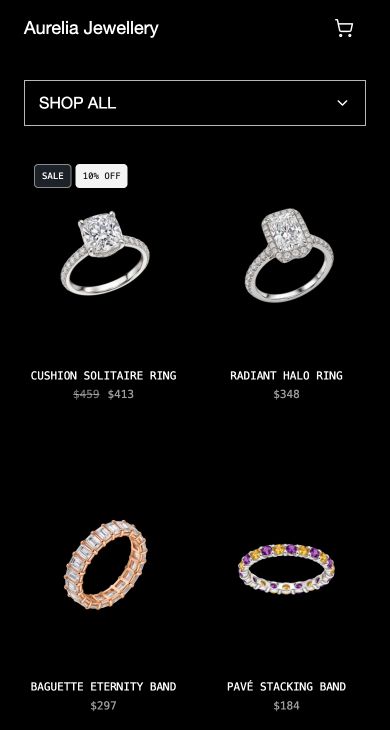
The name on your packaging. The name people recommend. Make it the address they come back to—with your own domain on your Inttegro shop.
Ready from day one
Your shop already has an Inttegro address when you open your account. Choose an available name to make it yours.
yourbrand.inttegro.shop
Make the move when you’re ready
Add a domain you own in Shop settings and follow the DNS instructions. Your products, prices and orders stay in Inttegro. There’s no storefront to rebuild.
Inttegro takes care of hosting your storefront.
Distribution, built in
Your storefront, shareable links, search tools and product feeds start with the same catalog. Explore what’s included and where to connect a channel.
Open your Inttegro account and your shop comes with it. Publish your products to a hosted storefront that works on desktop and mobile. An inttegro.shop address is assigned for you; make it your own or connect your domain.
Included from day one

Turn “Where can I buy this?” into a sale. Put your shop in your Instagram or TikTok bio, share a product in WhatsApp, or add a link to an email or SMS. Customers follow the link to buy from you, with image previews ready for sharing.
Share a link

The groundwork for getting found is already there. Shop creates product pages, sitemaps and structured prices and availability from your catalog. Add useful descriptions and good photos; Inttegro handles the technical product information. Search engines decide placement.
Discovery built in

Reach beyond people who already know your shop’s name. Publishing makes your products available to Inttegro’s public catalog search and connected shopping experiences, using the same product records you manage for your storefront.
One published catalog

Take your catalog to shoppers searching on Google. Shop generates the product feed—images, prices and availability—for eligible physical products. Connect the feed in Merchant Center and complete Google’s account, market and product requirements.
Connect Merchant Center

Prepare your products for a new way to shop. Your public product pages allow ChatGPT’s search crawler, and Shop generates an OpenAI-format product feed. Direct feed delivery requires partner onboarding; generating the feed alone does not list your products in ChatGPT.
Search & product feeds

Products & prices
Add a new ring, change a price or introduce a collection in Inttegro. Your storefront and product feeds draw from that same catalog, so you spend less time maintaining separate listings. Create a Buy link from a product when a customer wants to order directly.
Explore catalog & offersCheckout & conversion
They’ve found something they love. Keep them moving toward payment with guest checkout, browser autofill and payment inside your shop. On a phone or a laptop, the next step stays clear.
Explore Checkout
No account to create first. Autofill helps customers enter their details, and delivery fields only appear when the cart needs shipping.
Customers can review their items, quantities and subtotal before paying. Secure payment opens inside checkout, so they can finish where they started.
If payment fails, customers can try again. Refreshing checkout restores the order already created, so they don’t have to begin a new one.
Shop & product performance
Follow the money from the whole business down to the individual product. Inttegro brings revenue, paid orders, units sold and refunds into your reporting, so your next decision starts with what’s actually selling.
Aurelia Jewellery Example analytics · USD
paid or completed orders
Separate orders placed from orders paid. See how many purchases are still unpaid before treating an increase in orders as revenue.
200 units sold across 180 paid orders
Follow revenue day by day, then compare periods. Bring paid orders, units sold and average order value into the picture before planning your next move.
revenue from your #1 product
See which products carry your sales and how widely revenue is spread. Use each product’s sales, units and refunds to decide what to feature or restock.
More than a storefront
Put what you learn to work. Create an offer around a popular product, then tell your customers about it—all from the same Inttegro account.
Create coupons and promotions for your offers. Share a Buy link in a campaign or conversation to take interested customers straight to the product.
Explore Buy linksUse Chimes to send email and SMS from Inttegro. Share a new arrival, follow up on an enquiry or send a shop link to customers who have agreed to hear from you.
Explore ChimesMake it yours
The storefront is already there. Bring your products and your brand, then decide where you want to send your first customers.
Upload your photos, set your prices and publish your products. Your shop and discovery feeds use that catalog.
Choose your storefront’s look in Shop Studio. Add your contact details, delivery information and returns policy.
Use your assigned shop address, choose another available name or connect your own domain and complete its DNS setup. Preview your shop and confirm your payment setup before inviting customers in.
Your business, your way
Start with the tools in Inttegro. When your business needs its own workflow, connect your software to the catalog that already powers your shop.
Shop
No. Your Inttegro account includes a hosted shop and an assigned inttegro.shop address. Add and publish your products, personalize the storefront and review your payment setup. You can use the included address or connect a domain you already own.
Your storefront, shareable product links, search-engine sitemaps, structured product information and Inttegro public catalog discovery use your published products. Shop also generates Google Merchant and OpenAI-format feeds for eligible products. Each external channel has its own setup and eligibility requirements.
No. Google Shopping needs a Merchant Center connection and compliance with Google’s requirements. Shop allows ChatGPT’s search crawler, but search inclusion is not guaranteed. Direct OpenAI feed delivery still requires partner onboarding; the export is not an active listing connection.
Share a shop or product link wherever those apps support links. Customers follow it to your Inttegro storefront to browse and buy. This is link-based selling, not automatic catalog sync or checkout inside those social apps.
Yes. Connect a domain you own in Shop settings and add the DNS records shown. Inttegro hosts the shop behind that address. You can also change your assigned inttegro.shop address to another available name. Domain registration is separate.
Shop Studio lets you edit the Vivid storefront’s colors, fonts, imagery, copy and featured product. Preview the home page and product pages on desktop and mobile.
Customers review their cart and enter their details, then continue to Inttegro’s hosted payment page. Available payment methods depend on your account setup.
Add your contact details, delivery and pickup information, and returns policy in Shop settings. Manage purchases and their customer details in Inttegro. You arrange fulfillment and set the policies for your business; Shop does not promise a carrier service or delivery time on your behalf.