Optional cookies

We use analytics and advertising cookies to see how people use the site and whether our campaigns work. Read our privacy policy.

Skip to content
For businessFor developers
Products

Sell

Shop & channelsTurn your catalog into a storefront on your domainCatalog & offersManage products, prices, variants and promotionsBuy linksCreate a hosted offer you can share anywhereCheckoutCollect payment by link, on the web or in your app

Manage money

PaymentsAccept and track payment against every orderBalancesSee what is available, pending or committedPayoutsMove eligible funds to a bank account or walletRefundsReturn all or part of an eligible payment

Run the business

OrdersRun each sale from amount due to fulfillmentCustomersKeep identity, orders and payment methods togetherChimesSend email and SMS with delivery recordsAnalyticsConnect business metrics to the records behind them

From product to payment

Keep the whole sale connected.

Turn a product into an offer, collect payment, then keep the order, customer and money together.

See how Inttegro fits together ↗︎
Solutions

Individuals

Individuals & sole proprietorsSell products or services and manage every order yourself

Businesses

Online retailManage your range, checkout and customer ordersSocial sellingTurn messages and shared links into paid ordersServices & professional businessesInvoice clients and follow payment through completionCreators & digital businessesSell digital products with a clear payment recordNonprofits & fundraisingCollect contributions and keep supporter records

Platforms & groups

MarketplacesConnect seller accounts, orders and payout workflowsSoftware platformsGive every business commerce tools inside your platformConglomerates & business groupsOversee multiple businesses without combining their records

Marketplaces

Give every seller their own commerce account.

Keep each seller’s orders, customers and money separate while your marketplace owns the buying experience.

See marketplace tools ↗︎
Developers

Build

QuickstartMake your first integrationAPI referenceFind every resource, field and operationDemosWeb and mobile apps built with Inttegro SDKs.

Your tools

OpenAPIThe machine-readable specificationInsomniaOpen ready-made requests in InsomniaPostmanOpen ready-made requests in Postman

Integration support

Server SDKsUse an official SDK on your serverMobile SDKsAdd Mobile Money checkout to iOS and AndroidWeb/JS SDKsWeb Checkout and framework adaptersAI toolsUse Inttegro from ChatGPT, Claude, Codex, Cursor and more

Start with one order

Create an order through the API.

Use the quickstart to create an order and open its hosted checkout. Then choose the SDK or API tools that fit your stack.

Read the quickstart ↗︎
AI & integrations

Run commerce

Commerce with AIReview your business and carry out confirmed actionsMerchant workflowsSales, orders, customer care, reporting, and messaging

Connect and build

Connect your AI toolsUse Inttegro from the AI tools you already useBuild with AITurn a business requirement into an integration plan

Equip your agent

Developer skillsReusable guidance for integration, testing, debugging, and upgradesInttegro agent pluginMerchant workflows, developer skills, and focused specialist agents

Inttegro for AI

Bring commerce into the way you work with AI.

Run merchant workflows, connect your assistant, or give your builder a concrete integration plan.

Explore Inttegro for AI ↗︎
PricingContactSign inStart for free ↗︎

Menu

For businessFor developers
PricingContactSign inStart for free ↗︎

Payment links in Ghana

From “I want one” to an order.

The new release. The lesson someone asked about. Turn what you sell into a Buy Link, and share it wherever your customers find you.

Create a Buy LinkSee what your customer opens
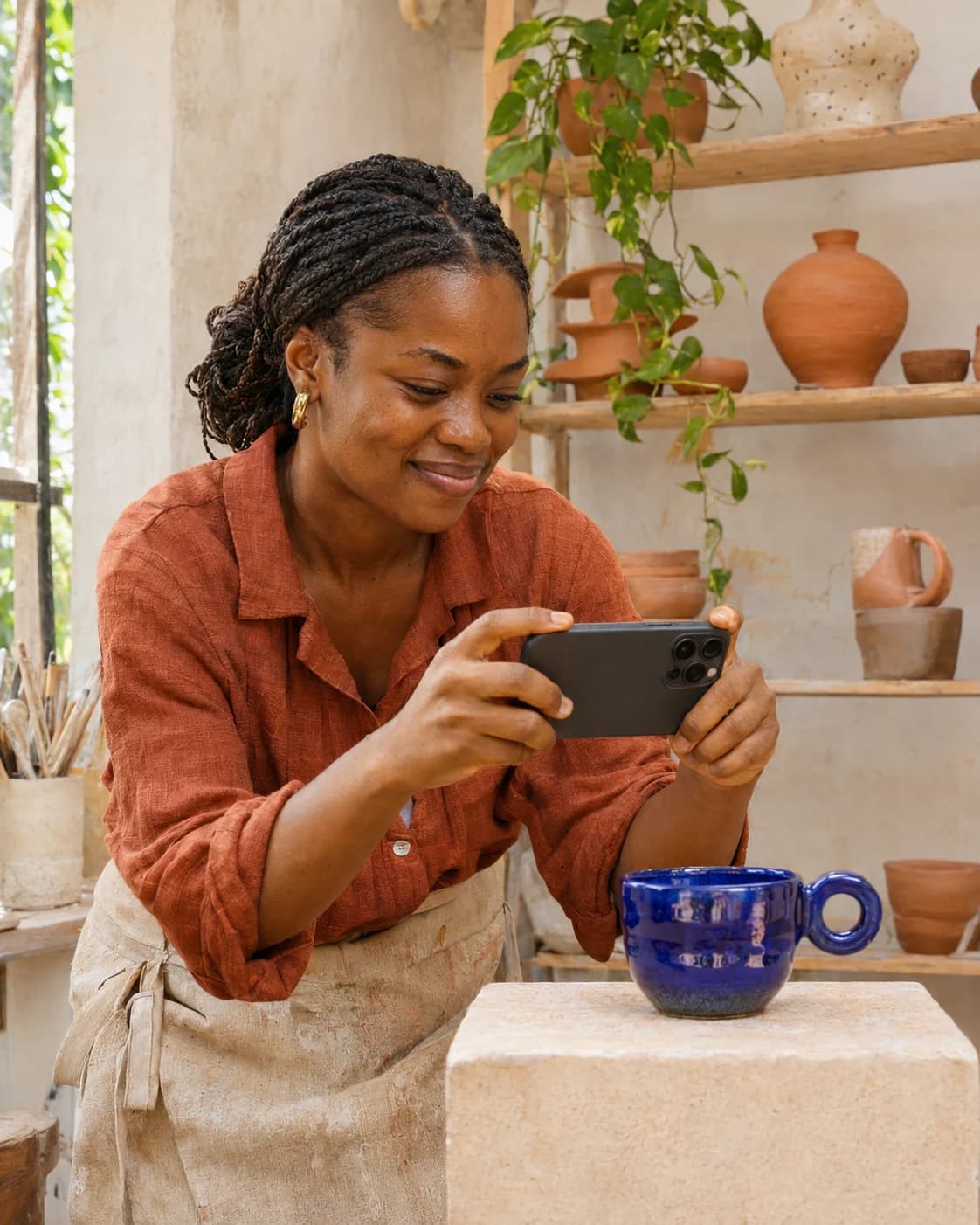
A ceramicist photographs a cobalt-blue cup with her phone in a sunlit studio.
Something you made. A link you can share.

One link. A clear offer.

More than a number to send money to.

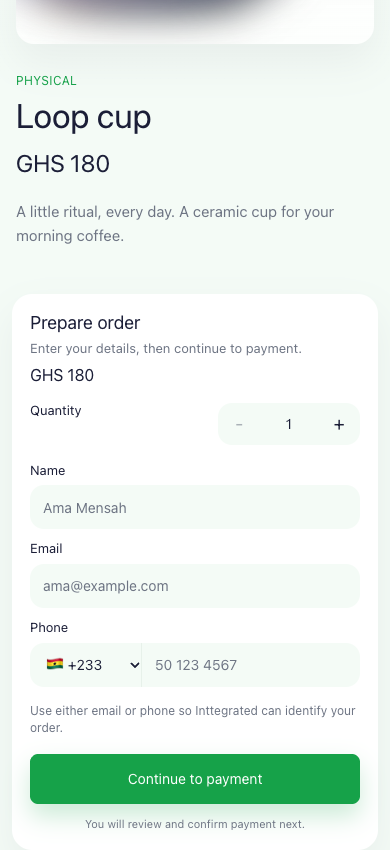
Your customer opens a page with the product, price and quantity. They add their details, then continue to payment.

Each accepted offer creates a separate order in Inttegro. You can follow what was bought, who bought it, and whether it has been paid.

Explore the buying experience

A hosted offer your customer can open

Hosted Inttegro Buy Link for the Loop cup at GHS 180, with quantity and customer details before payment.
Loop cup · GHS 180 · Example Buy Link

Share it your way

Keep the conversation. Add a way to buy.

You have already shown the work or agreed the service. Send a specific offer without asking your customer to find it all over again.

Send it in a conversation.

Share the exact product and price after a customer asks to buy in WhatsApp, Instagram, email, or another chat.

Use it in a campaign.

Put a reusable link in a social post, restock message, email, or QR code when many customers can buy the same offer.

Add it to your own page.

Link a button or product description to the hosted offer when you do not need to build a checkout yourself.

A guitar teacher demonstrates a chord to an online student through his laptop.

A skill worth sharing.

Agree the lesson with your customer, then send a link for the service. Keep your arrangements for scheduling and delivery.

A printmaker lifts a screen-printing frame to reveal a fresh orange and cobalt art print.

A new edition worth finding.

Show the collection to your audience. Share a reusable link so each buyer can place their own order.

More to discover? Give customers a Shop to browse

Before you share

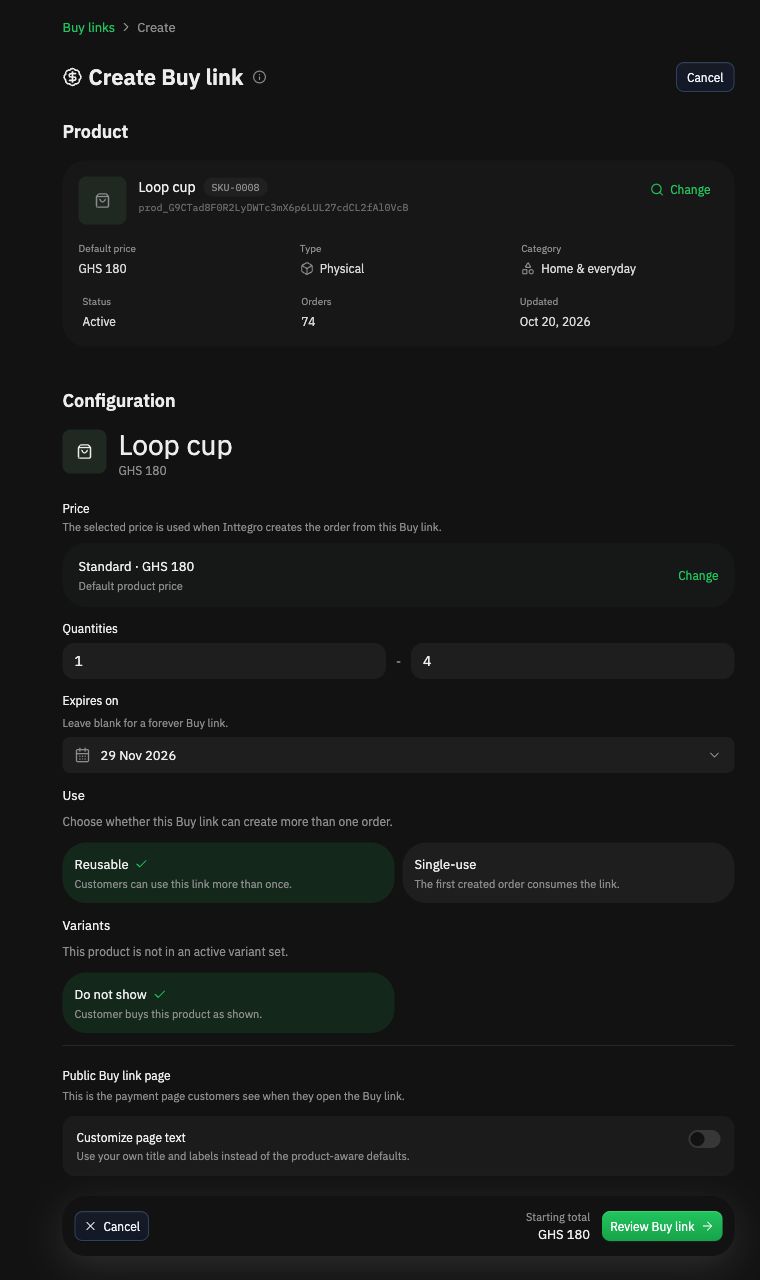
Set quantity, usage, and expiry.

These rules stay with the Buy Link wherever you paste it.

Quantity
Set the minimum and maximum number of units a customer can buy through the link.
Usage
Use one link for many orders, or reserve it for the first customer who creates an order.
Expiry
Leave the link open, choose an end date, or cancel it when the offer should stop.

Create Buy Link · Example screen

Dark-mode Create Buy link screen for the Loop cup at GHS 180, configured for quantities from one to four, reusable usage, and an expiry date.
Loop cup · Quantity 1–4 · Reusable · Expires 29 November 2026
View full-size setup screen

Orders from one link

Every customer gets a separate order.

A reusable Buy Link can stay the same while each customer keeps their own details, quantity, payment state, and order history.

Check the payment state before you fulfil. Creating an order does not mean it has been paid.

Explore Orders
Buy LinksLoop cupIllustrative orders
  • Ama AsanteINT-3232 · Qty 1
    GHS 180Paid
  • Kwame MensahINT-3238 · Qty 2
    GHS 360Awaiting payment
  • Afi DonkorINT-3241 · Qty 1
    GHS 180Paid
One reusable offer. Three separate order records.

Payment in Ghana

Collect eligible Mobile Money payments.

The customer reviews the product and price, enters their details, and continues to an eligible Ghana mobile-money method.
  • MTN Mobile Money
  • Telecel Cash
  • AirtelTigo Money

Available methods depend on the account and transaction. Cards, Apple Pay, and Google Pay are not available yet.

Standard rate

2%per payment

No account or service fees. Payout fees are included. Refunds are charged at 2%.

Review pricing

Common questions

Before you share the link.

Explore Buy Links
Is an Inttegro Buy Link the same as sending a mobile-money number?

No. A Buy Link carries the product, price, quantity and usage rules into a hosted buying page. The resulting payment attempt, order, and customer record stay connected inside Inttegro.

Can I share the same link with many customers?

Yes, when you configure the Buy Link as reusable. Each customer creates a separate order. A single-use link is consumed by the first created order, not by the first completed payment.

Can a customer choose how many units to buy?

Yes. Configure minimum and maximum quantities for the link. The exact options still depend on the selected product and price.

Should I use a Buy Link or an Inttegro Shop?

Use a Buy Link when the customer already understands a specific offer and needs a direct path to buy. Use a Shop when customers need to browse several products, compare options, or discover what else you sell.

Keep exploring

More ways to sell and collect payment.

Accept online payments in GhanaMobile money payments for online salesSell online in Ghana without waiting for a websiteExplore the complete Buy Links productUse a Shop when customers need to browseCompare Inttegro with Paystack in Ghana

By Inttegro · Updated 8 November 2026

Inttegro Buy LinksOrders and payment statePricing and product boundaries

Your next offer starts with a link.

Choose the product and price, set the rules, and share the link.

Create a Buy Link
Commerce infrastructure for the modern business

© 2026 Inttegro

Products

Shop & channelsCatalog & offersBuy linksCheckoutPaymentsBalancesPayoutsRefundsOrdersCustomersChimesAnalytics

Developers

QuickstartAPI referenceDemosOpenAPIInsomniaPostmanServer SDKsMobile SDKs

AI & integrations

Commerce with AIMerchant workflowsConnect your AI toolsBuild with AIDeveloper skillsInttegro agent plugin

Migration guides

StripePaystackShopifyWooCommerceWordPress

Company

PricingDownload DeskContactPrivacyTerms